
Setup, backups, and restoration used to feel stressful. I kept long checklists and worried I would miss a step. Now I use Ansible and Terraform for infrastructure as code in my homelab. Because everything is codified, the configuration stays consistent and my setup is easy to maintain. I can walk away for months and come back knowing I can tear down and rebuild anything cleanly. Terraform and Ansible work together so smoothly that the whole process feels good.
Laying the Foundation
There is still some manual setup for each new Proxmox node. I keep these steps simple so the overall homelab stays easy to maintain. The few things I still do by hand are: install Proxmox VE, create ZFS storage pools (a default machines pool plus a machines-fast pool on SSDs), cluster the nodes if needed, and configure network bridges (vmbr0 for main traffic and vmbr1 for storage).
That brings me to the first repository I want to share:
https://github.com/jrtashjian/homelab-proxmox-cluster
This repository manages the baseline setup of a Proxmox VE cluster. Ansible handles host-level tasks such as PCI passthrough configuration and kernel module setup across the nodes. After the basic Proxmox install and the Ansible playbook (which also creates the SSH user I use for all playbooks), Terraform takes over for cluster-wide management.
Terraform handles node time zones, network VLANs, firewall aliases and rules, NFS backup storage, daily backup jobs, InfluxDB metrics reporting, and a dedicated Terraform automation user with the right privileges. It also manages ACME certificate issuance for each node via Let’s Encrypt with Cloudflare DNS validation, and integrates with Authentik for SSO on the Proxmox web UI. I also set up an LXC template and a cloud-init VM template in this repository. Doing this here lets the other modules and projects use the dedicated Terraform user through the Proxmox API instead of needing direct SSH access to the hosts.
Building Consistent Machines
These templates lead naturally into the next two repositories:
https://github.com/jrtashjian/homelab-tfmod-proxmox-lxc
https://github.com/jrtashjian/homelab-tfmod-proxmox-vm
One creates reproducible Debian LXC containers on Proxmox. The other creates reproducible Debian cloud-init VMs on Proxmox. Both modules use nearly the same interface, so defining an LXC or a VM feels almost identical.
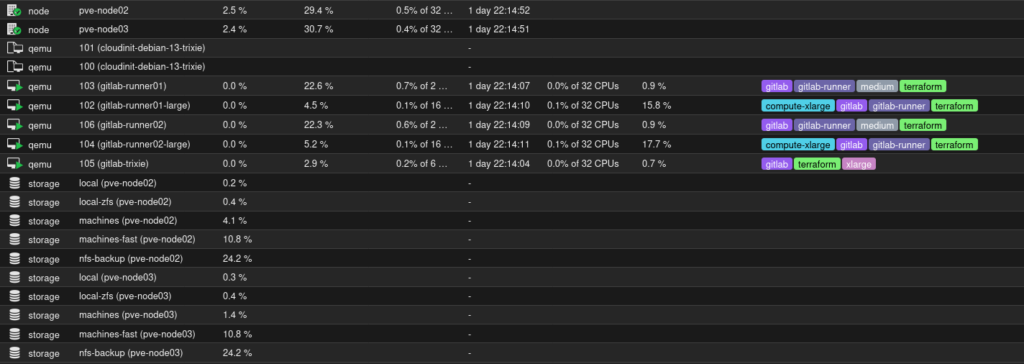
I wanted a consistent standard instead of every machine having different settings. Since I have been a huge fan of Linode over the years and still use them for VPSs, I modeled the machine presets after theirs: standard, high memory, and high compute. All my machines run Debian, so the modules are built with that in mind. It also makes tagging in Proxmox nicer.
I keep the configuration simple. The module defines the preset, and consumers can set the size (nano, small, medium, large, xlarge, highmem-medium, highmem-large, compute-large, compute-xlarge), add extra mounts for LXC or extra disks for VM, and pass through PCIe devices for VMs.
Watching a new machine appear exactly the way I want every single time is one of the small joys of this setup.
Putting It All Together
Here is a real example of how I use them together:
https://github.com/jrtashjian/homelab-infra-gitlab
This repository manages the provisioning and configuration of a self-hosted GitLab instance and its CI/CD runners. Terraform provisions the GitLab VM and the runner VMs on Proxmox using the shared VM module. It creates the main GitLab server, standard-sized runners, and large runners spread across the cluster nodes.
Then I run a deploy playbook that installs GitLab and the runners on the specified VMs and handles some initial system-level configuration. Ansible also configures the runner VMs with Docker and the GitLab Runner service, and manages runner registration and deregistration against the GitLab instance.
Now when I need to rebuild something, the configuration stays consistent and everything comes back clean and repeatable. No more hunting through old notes.
Wrapping Up
I share these projects because I enjoy seeing how other engineers tackle similar challenges in their homelabs. Maybe one of the ideas or repos gives you a useful starting point. Or maybe you have found a completely different way to handle the same problems.
How do you approach IaC in your own homelab? What solutions have you built that work well for you? Feel free to drop a comment and share your experiences.